


Frequently Asked Questions
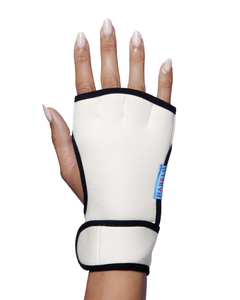
How do I use HABELO Treatment-Boosting Gloves?
Apply Activating Hand Serum, then wear the Treatment-Boosting Gloves for 20–40 minutes. The gloves are designed to support an occlusive hand-care routine. They do not need to be worn overnight.
How often should I use HABELO Activating Hand Serum?
Use Activating Hand Serum twice daily and again as needed throughout the day.
What does HABELO Activating Hand Serum do?
Activating Hand Serum is a serum-in-cream treatment formulated for the visible signs of aging on the hands. It helps support hydration, radiance, and a more plump-looking appearance.
What is Habelo
Habelo is the only performance-focused and purpose-driven hand beauty brand. Founded by Whitney Clarke in 2024, Habelo was created on the belief that ultimately, our hands are not just tools for tasks but mirrors reflecting our world to the world.
We design luxury facial-grade skincare that’s clinically effective, responsibly made, and beautiful to use by combining clean biotech, patent-pending innovation, and natural powerhouse ingredients for younger looking hands.
Where can I buy Habelo
Habelo is available online at habelobeauty.com and through selected retail partners. Visit our Stockists page for current locations.
Where are Habelo products made
Habelo skincare products are made in the USA using materials sourced globally. Our hand-sewn products, including the Treatment-Boosting Gloves, are made in China.
Are your products and packaging sustainable
We aim to make considered product and packaging choices and reduce unnecessary waste. Reuse and recycling options depend on the components and local facilities.
Are your products cruelty free and vegan
Yes. Habelo formulations are vegan and cruelty-free.
Do Habelo products meet Credo Beauty’s Clean Standard?
Yes. Habelo formulations meet Credo Beauty’s Clean Standard. We choose ingredients with performance and safety in mind.
How can I activate accessibility features
We believe in beauty for all. Accordingly, our site is designed with accessibility in mind and with additional accessibility features available.
To toggle accessibility settings, click or tap the icon on the right side of your screen. The icon remains viewable on every page, so it's there when you need it. You can also toggle this view by clicking or tapping the icon. Read more about accessibility here.
How do I manage my subscription?
You can manage your subscriptions anytime through your Habelo account. Log in and navigate to the "Manage Your Subscriptions" option.